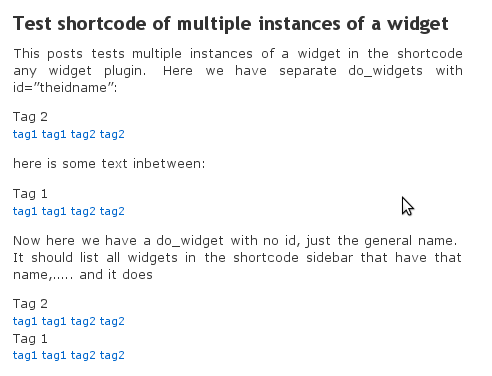
The “shortcode any widget” handles multiple instances

The shortcode any widget plugin can reference multiple instances of the same widget individually  by targeting the instances unique id.  If you use the general name without the id, it will list all widgets with that name.

EG:

Tags

or

Error: Your requested Widget "Tag Cloud" is not in the "Widgets for Shortcodes" sidebar

  • [do_widget_area sidebar-1]
    • [do_widget_area sidebar-2]
      • [do_widget_area sidebar-3]
        • [do_widget_area widgets_for_shortcodes]
          • [do_widget id="search-3"]
          • [do_widget id="rss-2"]
          • [do_widget id="rss-4"]
        • [do_widget_area wp_inactive_widgets]
          • [do_widget id="search-4"]
          • [do_widget id="search-2"]
          • [do_widget id="recent-posts-2"]
          • [do_widget id="tag_cloud-3"]
          • [do_widget id="text-2"]

        The trick is to be sure that you have the correct id’s, and the id names correct. For example, to double check I added two tag cloud widgets to my play system. The id’s ended up being “tag_cloud-3” and “tag_cloud-4”. You also need a separate do_widget for each – don’t put in the same shortcode
        Note:

        1. the underscore and the hyphen
        2. the fact that they were not numbered 1 and 2, even though I currently had no other tag cloud widgets

        How to find out the widget id?

        In the post or page where you have entered the shortcode, add to the url:

        ?do_widget_debug

        (replace ? with & if you already have a ?)

        If the do_widget shortcode fires, then it will list your sidebars and the widget ids and a bunch of other statements. Find the shortcode sidebar and see what the id of the widget is

        Alternatively:

        In some browser you can hover over your widgets or the edit links in the widget sidebar to really see what the id’s are.

        How to do the shortcode any widget

        and the result is……..

        Multiple widget instances

        Breadcrumbs with increasing indentation

        A vertical use of the Breadcrumb widget

        Indented Breadcrumbs
        Indented Breadcrumbs

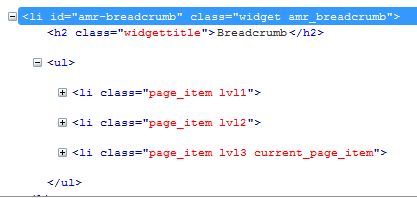
        A query was received from Kim asking how to indent successive levels of the breadcrumb widget links.  This was not possible in version 1.1, so version 1.2 has been released with css classes added for each breadcrumb indicating it’s depth in the menu.  This css class allows you then to assign your own styling to the levels.

        Example CSS:

        #amr-breadcrumb .lvl2{ padding-left: 1em;}
        #amr-breadcrumb .lvl3{ padding-left: 2em;}
        #amr-breadcrumb .lvl4{ padding-left: 3em;}

        HTML generated:

        HTML generated
        HTML generated

        Widget as shortcode – tips

        Want to keep the widget title to identify it from other instances of the same widget, but want to hide the title when the widget is used in a shortcode (ie in a page)?


        Error: Your Requested widget "widgetname " is not in the widget list.
        • [do_widget_area sidebar-1]
          • [do_widget_area sidebar-2]
            • [do_widget_area sidebar-3]
              • [do_widget_area widgets_for_shortcodes]
                • [do_widget id="search-3"]
                • [do_widget id="rss-2"]
                • [do_widget id="rss-4"]
              • [do_widget_area wp_inactive_widgets]
                • [do_widget id="search-4"]
                • [do_widget id="search-2"]
                • [do_widget id="recent-posts-2"]
                • [do_widget id="tag_cloud-3"]
                • [do_widget id="text-2"]

              Want to reference a pre-existing widget configuration in a sidebar?


              Error: Your Requested widget "sidebar=sidebar_name widget_id" is not in the widget list.
              • [do_widget_area sidebar-1]
                • [do_widget_area sidebar-2]
                  • [do_widget_area sidebar-3]
                    • [do_widget_area widgets_for_shortcodes]
                      • [do_widget id="search-3"]
                      • [do_widget id="rss-2"]
                      • [do_widget id="rss-4"]
                    • [do_widget_area wp_inactive_widgets]
                      • [do_widget id="search-4"]
                      • [do_widget id="search-2"]
                      • [do_widget id="recent-posts-2"]
                      • [do_widget id="tag_cloud-3"]
                      • [do_widget id="text-2"]