A picture is worth a 1000 words

Content may be king, but images are powerful.   A well designed website can be improved by appropriate use of quality images.

There are a number of places where one can find images that one may use to complement a website or article:

Stockxpert has an excellent set and is probably the best place to start

  • their photographers are vetted
  • the photo’s are excellently tagged and categorised to enable searching in a variety of ways.  the lightboxes help you bookmark and save.
  • the prices are reasonable, and the images are royalty free.
  • Note that you cannot use the material for resale – check and understand their standard license

Flickr is also a possibility, although since it is not primarily focused on providing stock images, it will probably be harder to find suitable images.  Here you must ensure that you

  • use the advanced search criteria to select only those images with the appropriate license
  • check the specific image license and follow the terms (ag: attribution)
  • the tagging and categorisation are not designed for our purposes
Rental Property Availability

A site that I help wanted to display property availability.  The clearskys availablity plugin seemed the best but was not quite working on my local wp 2.7 installation with wordpress relocated and separate content directory.

I got a bit carried away fixing it up a bit.   Changes made:

  • fixed to allow for wordpress in own directory, and relocated content directory
  • fix alternate logic of listing so shades will alternate
  • moved admin links to one section in admin  menu under Bookings for ease of user
  • allowed for additional properties through rudimentary include file – hopefully clearskys will provide a version soon.
  • changed to shortcode usage to upgrade and to avoid problems with validation (else wordpress insert a <p> before and </p> after – this breaks the validation.
  • developed a css file for the page calendar – for some reason their widget code and page code is different and delivers different css styling – add this to your standard stylesheet.

Disclaimers

Please note this is only intended as a temporary solution until clearsksy release an update which hopefully will cover all these points and more.

Live

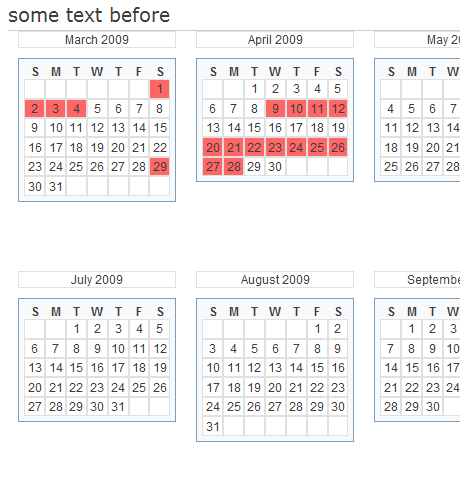
You can see it in work at http://bantrybayflat.co.za/.   At time of posting, there were no bookings to show, but it should look like this:

Multi  Month Calendar showing availability and booked dates
Multi Month Calendar showing availability and booked dates

More screenshots available in zip file.

Download at WordPress

Options for Membership web sites

This used to have a summary of options there are for developing a membership site using wordpress, but it’s a rapidly changing market and an up to date review is not available.

Whichever plugin you choose, before you get too sucked in, please consider your reporting and listing requirements. If the plugin does not assist you in querying or listing your members the way you need to, then the amr-users plugin may be able to help. There is a free version if your requirements are basic, and there are several add-ons for plugins that store data ‘differently’ from the wordpress user standard.