Oct
11

Shortcode a widget in a page or post

Shortcode any widget  

Available  at wordpress now – This plugin allows you to use any widget as a shortcode in a page or post with any theme.  While many plugin authors do provide a widget and a shortcode, not all do.  With this plugin there is no need to use the hybrid theme or create a special page template just to use a widget in a page or post.

For example

  • [do_widget id=tag_cloud-2]  will show the second tag cloud widget
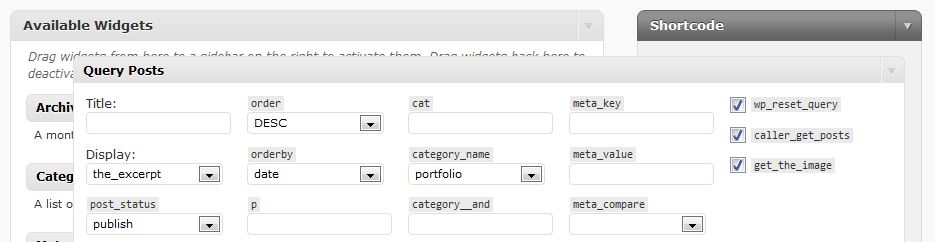
  •  [do_widget "query posts"] will allow you to have a selection of posts listed in your page.    The plugin uses a dummy sidebar called “shortcode” which allows one to use the widgets user interface to specify the custom settings.

The shortcode sidebar is a named widget sidebar only used to set up the widget settings.

Warning: Themes with numbered (or totally unnamed sidebars) do not work well this. Somehow since the plugin is creating the shortcode sidebar rather than a theme (and plugins seem to run befor the theme code), wordpress allocates it the number one slot. Named sidebars are okay, but others relying on being no.1 or the one and only are pushed out. Fixed in version 1.12.

Primarily I have in mind that one would want to list posts by excerpts  for a category or a tag group within a discussion of the subject.  Thus one could have multiple portfolio pages.  This is achieved using  Justin Tadlocks query posts widget with this do_widget shortcode.  One could also try using the template tags shortcode plugin also by Justin Tadlock to achieve similar functionality. The differences with this plugin are

  • any widget could be used (as opposed to template tags)
  • no special UI (User Interface) needed as each widget’s own UI is used to set any settings

I’d love to hear other ways that people might decide to use this plugin.

Download: amr_shortcode_any_widget
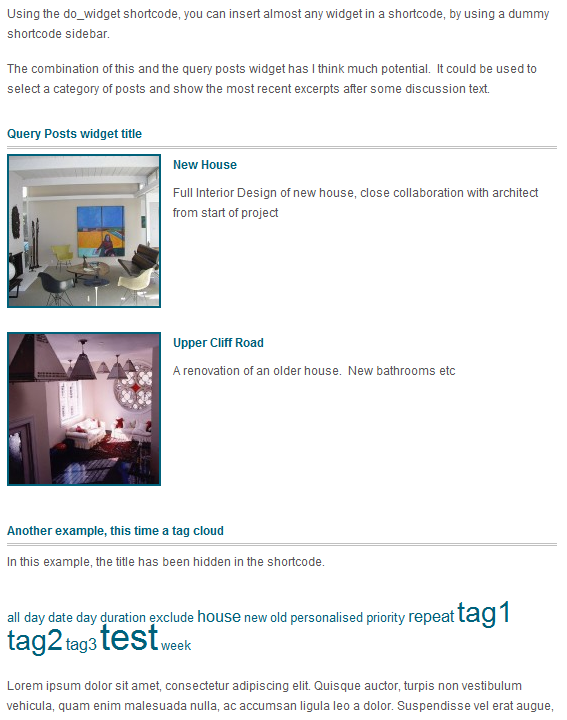
Demonstration of t wo widgets called with shortcodes from within page or post text

Demonstration of two widgets called with shortcodes from within page or post text

The Shortcode Sidebar - Add the widgets that you wish to use as shortcodes.

The Shortcode Sidebar - Add the widgets that you wish to use as shortcodes.

Set the widget's settings

Set the widget's settings

Edit thepage, inserting the do_widget shortcode

Edit thepage, inserting the do_widget shortcode

Related posts:

  1. The “shortcode any widget” handles multiple instances The shortcode any widget plugin can reference multiple instances of the same widget individually  by targeting the instances unique id. ...
  2. Widget as shortcode – tips Want to keep the widget title to identify it from other instances of the same widget, but want to hide...
  3. Initial content for a new page or post – wordpress pleasant surprise How to create a link to the add new page or post with default starting content...
  4. Subscribe2 widget markup and css Please refer to updated instructions. The wordpress subscribe 2 plugin is great. Version 4.9 just released – a wonderful alternative...
  5. Widgetized headers and footers? Dynamic (widgetized) Sidebars are great, but would you not like to have a dynamic header and footer in your theme...

40 Comments

1

Nice idea. What are the primary use cases you are targeting?

2

I’m using WP 2.8.5 and the Thematic Framework.
I get the following error trying to use a Query Posts Widget in my page with the following shortcode [do_widget "query posts"]:

Warning: array_intersect() [function.array-intersect]: Argument #2 is not an array in /*/*/*/*/wp-content/plugins/amr_shortcode_any_widget.php on line 57

line 57:
/* get the intersect of the 2 widget setups so we just get the widget we want */
$wid = array_intersect ($_wp_sidebars_widgets[$sidebarid],$widget_ids );
if ($debug) { echo ‘Chosen Widget ids in Chosen sidebar’;print_r($wid);}

I also wan’t to ask how can I use more than one instace of the same widget, since they have the same name.

Thank you,

3

Hi marcello,
a quick reply while on the run… Clearly looks like I need to error trap a bit more. Will also write up more.

Try entering Query Posts ie with the capitals. [do_widget "Query Posts"]

This will grab whether instances have been defined in the shortcode sidebar.

To access only ONE, view source to find the query post id and enter [do_widget id="query-posts-n"] .

Hope that makes sense for now.

4

Hey! thank you.
Works with [do_widget "Query Posts"] but it doesn’t work with [do_widget id="query-posts-n"], it doesn’t return any errors but renders no content. I inspected the widget and got it’s id that’s clearly visible in the widgets panel HTML code and when it renders correctly in the page.

any clue?

I’ll be using Display Widgets plugin to restrict appereance in the meantime.

Thank you.

5

Hi Marcelo, Sorry if in my rush I was not clear enough, Yes – Replace “n” with the number of the widget id.

IE: you need exactly the widget id that shows in the html source to isolate the exact instance if you are using a widget multiple times.

It seems from your comment that you had worked that out but did not realise that that was what I meant.

Do you have it working now?

6

Well – my requirement was to use query posts in a way that would work across themes – ie I did not want to have to write theme templates that did what query posts does.

QP did not have a shortcode and while I could modify it, I prefer to stay with the upgrade path.

Many author seems to deliver a widget without also doing a shortcode – it is quite easy to offer both callingthe same code.

…and so “do widget” was born. It can be used for any widget since it is essentially capturing the output of the widget function and returning that as the shortcode function result.

7

Hi.
I got it working perfectly with the [do_widget "Query Posts"] but not with [do_widget id="query-posts-n"] shortcode.

I replaced the n with the ID i got from inspecting the widget with firebug, in my case it’s query-posts-4, but it doesn’t work that way even if I have only this one widget. It returns empty content, but no errors.

Sorry if I wasn’t clear. But if it works for you, it’s sure something to do with my setup or a conflict with another plugin. (maybe).

cya

8

Hi Anna-Marie,

Nice plugin and it does what it “says on the tin”. My only issue with it is that it seems to interfere with the other Sidebars on my site. It’s as though, even though the sidebar isn’t displayed by the theme (Atahualpa342), the sidebar grabs the formatting done for the first sidebar on my site. So effectively side bar one loses formatting, side bar two uses formatting of side bar one, side bar three uses formatting of side bar two and so on (I have 5 sidebars).

I haven’t had time to properly investigate (mostly due to a 3 year old toddler running around wanting to play at pirates!), my initial thought is that the sidebar registered for the plugin might need to be in functions.php

Thanks again for the plugin. I have a feeling its gone to be exactly what I need to work with, as you suggested, the Query Posts plugin

Adrian

9

My primary use was to avoid creating a theme dependant template to list a subset of posts. So I wanted the widget “query post” functionality in a page – this would then work no matter what theme I switched to.

As far as other uses go…. anything is possible. Ideally of course every widget should also be available as a short code and this plugin would then be uneccessary.

10

Hi Adrian,
Yes I can see two year old pirates could be quite distracting – I have the ambitious young chef problem, but I think that is easier to deal with!

I think that there is a problem for the plugin with

  1. the way that wordpress does the sidebars and
  2. theme’s that use numbered sidebars rather than named ones (eg: the default theme)

Because the plugin is registering the “shortcode” sidebar, and plugins run before themes I think – it seems to grab the no. 1 slot. This seems to shift any theme numbered sidebar to 2nd place – this happens with the default theme. This is not a problem with themes that register and access their sidebars by name (eg: the ithemes series).

I did play around seeing if I could get the “shortcode” sidebar to register later, but no go.

Because of this I did spend some time looking at whether one could use the dummy “inactive widgets sidebar” and did hit some annoyances there and have not had a chance to get back to it.

This is sort of related to the Sidebars and Switching themes problem if one want to reuse a group of widgets – see http://wordpress.org/extend/ideas/topic.php?id=2550.

So to fix for you…. you could

  1. change your theme to use named sidebars – see the functions.php in your theme and the sidebar.php
  2. see if one of the other plugins will work better – there are a couple that say they create dummy sidebars that can then be accessed from a page. I suspect that they will have the same problem with your theme.
  3. Wait to see if I have time to work further on using the inactive widgets sidebar instead of a special “shortcode” one – that way one could configure the widget in the theme’s sidebar and then move it to inactive and access by id there
11

Thanks for the response Anne-Marie and yes, I agree it is undoubtedly an inherent problem with the theme and not the plugin, (or maybe not a problem, but perhaps a fundamental issue with sidebar management in WP, as it says also in the link you provided)

I did actually get the theme to work with the plugin by tweaking functions.php, but then, as we always do, went off at another tangent and ended up working on something else.

I’m quite enjoying learning about how WP fits together and looking at how plugins and themes are coded is a great help.

Thanks again and have a nice day

12

While I liked the feature that this plug-in gave at first, I have noticed in the second day using it that it doesn’t seem to play well with some other plug-ins. It sometimes switches the order of all of my widgets (on other pages and sidebars) around, and sometimes deletes the content within my other sidebars completely. I’m not sure if it’s just a specific plug-in that I have that it doesn’t work well with as I use several, but those who are planning to use this in conjunction with some of the more common plug-ins may want to beware. Back up the content & code within your sidebar widgets so that if it gets deleted you can at least replace it easily. I’m having to re-do a lot of things on our new site because I hadn’t anticipated this issue, but I at least wanted others to be aware.

If there is any fix I’d be interested to know what it is, because otherwise I’m left with creating the new page template, sidebar etc.

13

Dear IKS,
If you look back at the comments a couple before yours, eg: Adrians http://webdesign.anmari.com/shortcode-any-widget/#comment-3955
you will see that the problem occurs with themes that use numbered sidebars rather than named sidebars.

No information is deleted and the effect is NOT intentional. If you deactivate the plugin your theme should grab the no.1 spot again.

Some fix ideas are mentioned above. I had spend quite a bit if time looking at it, to try to get wordpress to add the shortcode sidebar later after the themes, however did not succeed and had to move on to real work. (I’ve never liked the way that wordpress does the sidebars and this is one of the reasons why – but perhaps the problem is the themes being a bit “casual” with their sidebars? or wordpress allowing a casualness?)

A nice big warning has now been added to the plugin home page.

14

Hi Anmari,

Unfortunately, even when I deactivated the plug-in nearly all of my content from the widgets in my other sidebars was gone (save for two widgets, I think). It’s rather unfortunate that the problem seems to be the theme, as I don’t intend to change it and I’m not sure how to go forward with the fix that involves editing functions.php and sidebar.php (I really wouldn’t know what to change). Oh well, the solution would have been perfect if it had worked.

15

I have a widget that is a daily quote, can I use this plug-in to post the quotes on a post page instead of the side bar and it include the previous quotes on the same page?

16

Love the plugin, i have been using it in conjunction with tables to put 3 widgets in a row. it’s a shame that it does not put the widget block/header graphic in. Is it possible to do this?

17

Hi Jon,
Why don’t you just put the html of the widget header in around the shortcode? That should be pretty simple.

18

Hi Anna – Thanks for that simple solution, unfortunately i’m a simple person and don’t know how to do any of that. Please can you show me?

19

[...] Fuzz Is this possible? I would like to place the widget without using a sidebar Have a look at this [...]

20

thank you very much… three months searching for this… very powerful plugin.

21

I just found this plugin, great idea by the way. It works fine if I have just one of a given item, for example, “Tabber Widget”, but when I add the second, and I set each to id=”tabber-widget-1″, and id=”tabber-widget-2″, neither one shows. Did I misunderstand?

22

Hi Danny, it does work with multiple instances of many widgets – I don’t know the tabber widget.

The trick is to be sure that you have the correct id’s, and the id names correct. For example, to double check I added two tag cloud widgets to my play system. The id’s ended up being “tag_cloud-3″ and “tag_cloud-4″. You also need a separate do_widget for each – don’t put in the same shortcode
Note:

  1. the underscore and the hyphen
  2. the fact that they were not numbered 1 and 2, even though I currently had no other tag cloud widgets

Hover over the widgets or the edit link in the widget sidebar to really see what the id’s are. See also
http://webdesign.anmari.com/the-shortcode-any-widget-handles-multiple-instances/

23

I did notice latter the underscore, vs hyphen, however I am still having problems. I looked in the shortcodes sidebar, I assume that is the one you are talking about, and tried to hover over in both safari, and in firefox, and I did not see the widget id, I am running 2.9.2 I haven’t moved over to the beta yet. The widget in questions is a free one from iThemes.com, it uses jQuery to give multiple tabs each creating it’s own widget for content. It is the tabber itself that I put into the shortcodes sidebar, not one of the children. Thanks for your help!
Danny

24

Hello!

I have made translation of Your plugin into Belorussian. Please check Your email & answer to me.

25

Danny, I fired up safari myself and yes I see that it is rather unhelpful in this case. Unless Safari has some sort of web developer tool that will let you “inspect the element”, you will have to run firefox or even chrome – the correct id’s are the only way to uniquely identify a single instance if you are going to have multiple instances. If you do NOT need to have multiple instances of the same widget, then it is much easier to just use the name.

Note: Using the name will cause all of them to be listed too – if you get the order right, this may achieve whatever effect you are trying to achieve, without having to identify them individually.

26

@anna-marie, why you ignore my comment & my transalation, what i sent to you?

27

Marcis,

I did not receive an email with translation for this plugin – I did receive multiple emails for the breadcrumb widget translation. That translation has been included in the latest update, with acknowledgement in the changelog.

Thank You

28

Hi Anna-Marie,

want to use your plugin on my site the same way you did (in combination with query posts) because I tink it’s a very simple solution.

The Problem is: Nothing shows up in my page after using the shortcode. But I think I did everything exactly like you did.

- Getting the Plugins
- Drag Query-Posts into Shortcodes Sidebar
- Using [do_widget "Query Posts"] somewhere in my page

I’m using WP 2.8.4. I also tried the Plugin in another Blog with just the same result: nothing is showing up in my page. By the way the query-posts widget is working well when I put it into another sidebar.

Any Ideas?! I really want to use this, because I do not have to change the Code this way…

THX for your help!

29

Hi liebesbeweise,

I have just doubled checked it myself on wp3.0beta and no problem.
Procedure:

drag query posts widget to a visible sidebar and configure it.

check that the output is what you want.

Now drag that self same widget from the visible sidebar to the shortcodes sidebar.

Create a page or post with [do_widget "Query Posts"], and publish it, View it.

If that still does not work, Try a different widget (maybe a plain text one) to see whether with the do_widget, this should at least tell us whether it is only QP’s that are a problem on your system.

30

Hi & thanks for the plugin Anna-Marie

Using the ID attribute gives weird results, especially when you move the widgets around in the sidebar.

If you’re interested, I modified a little your code to use widget instance IDs instead of widget names:
http://pastebin.com/tM5K4jyL

The unique ID is shown in the widget options after you press save.

(ps: I’m using this for a theme I’m developing – http://wp.digitalnature.eu/atom/widgets

31

Hi Mile,

Thanks for letting me know.

Perhaps you could clarify what you mean by weird results? (If it is style changes as you move a widget from one sidebar to another, that could be because the theme’s css uses the sidebar in the selectors?). the instance id should stay the same so I cannot think what else might happen as you move it? I think keeping the html id was intended to cope with those circumstances where special styling had been developed possibly using the id’s, so that that styling would carry through to the widget in the page.

Note that the name is good to keep because

some inexperienced folk are using wordpress these days and they don’t know how to find the id, whereas name is quite visible
some browsers (was it safari?) the id was not easily visible on hover, one had to go to page source to find it – a pain

Also FYI and for other readers, cambridge newmedia (the ym plugins) also have a shortcode widget plugin.

32

well for example using [do_widget Calendar id=2] will output both Calendar widgets, instead of just the 2nd.

anyways, here’s my final take (I added the ‘number’ parameter as well):
http://pastebin.com/zLV2q7Bg

here you can see what I meant by IDs (basically a unique md5 hashed string from the widget instance ID)…

another idea is to remove the widget title html from $output using php DOM functions, instead of hiding it…

33

Hi Mile,

that’s probably because your syntax is not quite right – you are doing two things in one. So either do one or another:

[do_widget calendar] will do all calendars in the shortcode sidebar

[do_widget id="calendar-2" ] will do only one instance

This post has related info http://webdesign.anmari.com/the-shortcode-any-widget-handles-multiple-instances/

34

ah I see now.
still, the ID you use is hard to figure out by the common WP user. Aren’t the generated IDs from the widget options, or the Widget Name + Number (in the sidebar) better solutions?

you should really modify your code to support that, because this plugin has a lot of potential :)

Bye

35

Hi Mile, I think 3.0 must have changed something because when I wrote the plugin that is exactly what it was using. However looking now it seems that the widgets have longer id’s now. Now I see
widget-22_archives-2 instead of archives-2.

I do like to keep them up to date but time is an issue!

Thanks for flagging it though – I’ll make a note to look at it when I can.

36

hi anne-marie and thank for sharing your pretty plugin.

i would like to call it from the theme instead of shortcode, how would be the proper sintax to call it?

in guess something like

if ( function_exists(‘do_widget’) )
{do_widget(‘SimpleLogin’);

but this way isn’t work to me.

could you explain it to me?

best regard, pescadito

37

Hi pescadito,
I have not tried this myself but something like
do_widget(array(
‘sidebar’ => ‘Shortcodes’,
‘id’ => ‘id of widget you want’, or 0=> widgetname
‘title’ => ‘true’ ))

However I don’t recommend this, since it presupposes that the widget configuration has already been done in the shortcode sidebar and somehow it seems wrong to me that a theme should require config to be already in place? Themes are usually somewhat self contained and standalone.

38

ok anne-marie,

you have rigth, your point it’s true.

perhaps it can be done more properly with something like

but some widgets have a lot of options and setting this in the widget sidebar is more confortable, at last while we are setting up the blog.

and thank for your time,

best regard, pescadito.

39

Hi Anna-Marie,

I’ve been goggling around looking for a simple yet powerful plugin that allow me to add widgets in page or post. I’ve been using widget logic before.

I’ve tried the plugin and it work like a charm in a page. However it didn’t work and nothing shows when i included the same widgets and shortcode in a post. I’ve make sure to turn off the widget logic but still no avail.

Btw, the theme i’m using is lifestyle 4.0

Please help me.
Eddy

40

Hi Eddy,

I do not know what you mean by switching the widget logic off. The plugin is quite simple and it fit works in a page, then it should work in a post unless some other plugin is blocking filters, or you have not identified the widget suitably for the plugin. See below.

When viewing your post, add to the url (replace ? with & if you already have a ?)

?do_widget_debug

If the do_widget shortcode fires, then it will list your sidebars and the widget ids and a bunch of other statements.

Find the shortcode sidebar and see what the id of the widget is. See any message below about not finding widgets or names.

Check that you have either

Using the shortcode-any-widget plugin, please note that you can use either:

[do_widget id=tag_cloud-3]

or

[do_widget "Tag Cloud"]

note the quotes, and of course replace tag cloud with your widget name.

See here http://webdesign.anmari.com/category/plugins/shortcode-any-widget/

WP Questions

Preferred Web Host

Web hosting by ICDSoft Icdsoft - Why? They are good and reasonable, used them since 2001. Read more