Some web owners or email newsletter providers wish to personalise their email newsletters or their users experience when browsing their website. Wordpress plugins have various methods of sending out emails to a customer base, but can they personalise them? [Plugin amr-personalise just released allows personalisation of wordpress emails, pages, or posts]
Firstly, what do we mean by personalised?
A truly personalised communication is more than just a greeting by name. Offering the ability to use more information than just the name is not always as easy a task as it may seem. Indeed even if one is just talking about a personalised greeting, there are many differing opinions on whether there it is worth doing at all. When almost every spammer seems to know the recipients name, is there value in bothering with just that?
Pros of personalising
- Some people believe that the recipients value it and some people it is a waste of time and can be detrimental.
- Done well, it could be used to verify that the email is not a scam, by offering partial confirmation of details (EG: your account ending in 9876). Again some recipients do not like having their personal details echoed in an email and would prefer to simply be requested to go to the website
Cons or Pitfalls
Some common mistakes or pitfalls with even very basic personalisation such as a personalised greeting, are:
- Asking for too much information upfront is dangerous:
- making it harder for people to sign up may reduce the number of signups.
- some find the request for more information than is needed intrusive and may respond with garbage to get past these fields. By echoing the garbage back, when communicating, the business reminds the reader of their attempt to gather more information than is necesary to deliver the product.
-
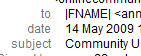
Example of Error in Personalisation Operator errors in setting up the emails. Many of us who receive a lot of email letters, often receive such emails with errors. For example I receive one every week with the same error from a large enterprise that publishes printed community newspapers. (Not the only personal example I have!)
- So many spammers or phishing emails are personalised that you risk looking like one of them. To reduce this risk, if you decide to personalise a greeting, do not personalise the subject line using the name, and do not have the name in uppercase this is a classic spammer look
Review of some opinions available on the web.
- Aweber – one of the major providers of Email Marketing Campaign tools has a tip that suggests that one “Think before you personalise” and asks “Isn’t There More To A Truly “Personal” Email Than A Name?”
- Webmasterworld has a post by Tedster that says
I’d like to take a closer look at the idea of personalizing mass emails: using the person’s name in the subject, the greeting, and/or the body copy……
First, this is a technique and NOT really a relationship. It’s an electronic database trick and almost everyone knows that. A lot of the industry “information” that recommends personalization so very strongly actually originates with a company who sells personalization software!
- webdynamic.com.au is a company that sells personalization software. They have an article which describes how a truly personalised email is more than just “Dear <First Name>”
- freemarketingzone.com is another such company that offers tips on personalising emails and at least mentions some of the errors and pitfalls and differences of opinion. They recommend testing to determine whether it is worth personalising.
When is something a truly personalised email?
It is more than just a greeting by name. It will reflect information specific to or of specific interest to the recipient (this is more commonly known as targeted emails or segmenting your customers). This page at the UK financial services authority has some useful examples and discusses what is and is not a personalised communication. The following link discusess web personalisation is a much broader sense than just emails – Boxes and Arrrows says in an old but still true (imho) post: Personalization is not Technology….. Web personalization is a strategy, a marketing tool, and an art
WordPress Plugins or Options
So are there wordpress plugins that allow personalisation and if they don’t why not?
- The major free subscription “email” plugins do not offer personalisation. Their aim is primarily to make it as easy as possible for users to sign up. To do this they gather the minimum data (eg: a confirmed email address). Thus for many of the users in the wordpress database, there will be no name to use, so why bother.
- The low cost membership plugins offer some personalisation once the user is logged in, but not yet in sending emails. The more expensive software options typically do offer this functionality.
- Of course there are also the regular monthly cost third party services such as Aweber, GetResponse, Pro autoresponder. These may be worth considering if you have a high volume and generate enough income to justify the costs.
And then there is:
I have developed a plugin that allows access to the user meta data, so that one may reflect this information if the user is logged in, or in emails. It will be ready in the next week or so. Personally I am not a fan of superficial personalisation, as this can make things unnecessarily complex and if errors are made, can make your web or email look unprofessional. However there has been a need and the request made. So far it works with shortcodes in pages or posts. It will work with Subscribe2 and Cambridge New Media’s Your Responder.(still in beta).
Stay tuned!